












Computing
#ManorParkComputerScientists
Intent
It is the intention of Manor Park to provide a computing curriculum that imparts pupils with the knowledge of risks online and how to remain safe enabling pupils to use technology in a responsible way independently. Technology is everywhere and will play a pivotal part in students' lives. Therefore, we want to model and educate our pupils on how to use technology positively, responsibly and safely. We want our pupils to be creators not consumers and our broad curriculum encompassing computer science, information technology and digital literacy reflects this. A curriculum that allows them to gain skills that will equip them for life. It is our intent that our computing curriculum seeks to engage and enrich children’s experiences in school through digital literacy, ICT and computer science allowing them to become confident digital learners who use computational thinking in an ever-changing digital world.
We want our pupils to be fluent with a range of tools to best express their understanding and hope that by the end of Lower Key Stage 2, children have the independence and confidence to choose the best tool to fulfil the task and challenge set by teachers.
Implementation
Provision
The units for key stages 1 and 2 are based on a spiral curriculum. This means that each of the themes is revisited regularly (at least once in each year group), and pupils revisit each theme through a new unit that consolidates and builds on prior learning within that theme. This style of curriculum design reduces the amount of knowledge lost through forgetting, as topics are revisited yearly. It also ensures that connections are made even if different teachers are teaching the units within a theme in consecutive years.
Through weekly computing lessons, we use the Teach Computing scheme of learning to teach Computing at our school. These schemes are exciting, challenging and relevant for our pupils. They ensure our children have the up to date skills and knowledge in the subject. Covering the full breadth of skills to make sure that our pupils develop enjoyment and enthusiasm for the subject. We have created a comprehensive progression document for staff to follow to best embed and cover every element of the computing curriculum. The knowledge/skills statements build year on year to deepen and challenge our learners. (See the Teach Computing spiral curriculum chart and long term planner below to see what each pupil will cover in their learning journey at our school).
To provide a deeper knowledge for children to be safer online, we amended our curriculum from last year to include a keeping safe online lesson as the first lesson of each topic from ‘Common Sense Education’, which provides excellent and detailed Digital Citizenship lessons for our learners. The UK has multiple statutory requirements for teachers to teach digital citizenship. Common Sense resources are recommended in the Education for a Connected World framework as essential skills for today's learner. These lessons will engage learners to think critically, participate responsibly and take ownership of their digital lives.
Assessment
Every lesson includes formative assessment opportunities for teachers to use. These opportunities are listed in the lesson plan and lesson slides and are included to ensure misconceptions are recognised and addressed if they should occur. They vary from teacher observation, a thumbs up or down, questioning or marked activities.
Learning objectives and success criteria are introduced in the slides at the beginning of every lesson. At the end of every lesson pupils are invited to assess how well they feel they have met the learning objective This gives pupils a reminder of the content that has been covered, as well as a chance to reflect.
These assessments are vital to ensure that teachers are adapting their teaching to suit the needs of the pupils. It is also a chance for teachers to see how confident the class are feeling so they can make changes to subsequent lessens accordingly.
Every unit also includes a summative assessment framework in the form of either a multiple choice quiz (MCQ) or a rubric. All units are designed to cover both skill and concepts from across the computing national curriculum. Within the ‘programming’ units the assessment framework has been selected on a best fit basis.
|
Autumn 1 |
Autumn 2 |
Spring 1 |
Spring 2 |
Summer 1 |
Summer 2 |
|
|---|---|---|---|---|---|---|
|
Reception (Barefoot units) |
Awesome Autumn |
Busy Bodies |
Winter Warmers |
Springtime |
Boats Ahoy |
Summer Fun |
|
Year 1 (Teach computing) |
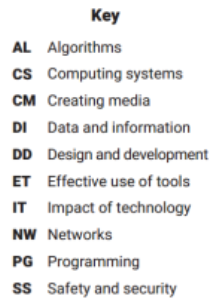
Digital Citizenship Lesson SS, IT Technology around us CS, AL |
Digital Citizenship Lesson SS, IT Creating Media -Digital Painting ET, CM |
Digital Citizenship Lesson SS, IT Programming A -Moving a Robot AL, PG |
Digital Citizenship Lesson SS, IT Data and Information - Grouping Data DI, AL |
Digital Citizenship Lesson SS, IT Creating Media -Digital Writing ET, CM |
Digital Citizenship Lesson SS, IT Programming B - Programming Animations PG, DD |
|
Year 2 |
Digital Citizenship Lesson SS, IT Information Technology around us CS, NW |
Digital Citizenship Lesson SS, IT Creating Media - Digital Photography ET , CM |
Digital Citizenship Lesson SS, IT Programming A - Robot Algorithms AL, PG |
Digital Citizenship Lesson SS, IT Data and Information- Pictograms DI, ET |
Digital Citizenship Lesson SS, IT Creating Media - Digital Music CM, DD |
Digital Citizenship Lesson SS, IT Programming B - Programming Quizzes PG, DD |
|
Year 3 |
Digital Citizenship Lesson SS, IT Connecting Computers NW, CS
|
Digital Citizenship Lesson SS, IT Creating Media - Stop Frame Animation ET, CM |
Digital Citizenship Lesson SS, IT Programming A - Sequencing Sounds ET, CM |
Digital Citizenship Lesson SS, IT Data and Information -Branching Databases DI, ET |
Digital Citizenship Lesson SS, IT Creating Media - Desktop Publishing ET, CM |
Digital Citizenship Lesson SS, IT Programming B - vents and Actions in Programs PG, DD |
|
Year 4 |
Digital Citizenship Lesson SS, IT The Internet NW, CS
|
Digital Citizenship Lesson SS, IT Creating Media - Audio Production ET, CM |
Digital Citizenship Lesson SS, IT Programming A - Repetition of Shapes AL, PG |
Digital Citizenship Lesson SS, IT Data and Information - Data Logging CS, DI |
Digital Citizenship Lesson SS, IT Creating Media - Photo Editing ET, CM |
Digital Citizenship Lesson SS, IT Programming B - Repetition in Games PG, DD |
Impact
Children are able to demonstrate their ability in computing in a variety of different ways. We currently assess children’s work by making informal judgments during lessons and will soon be using end of term assessment and logging this data on Insight. We use this information to plan future learning. Verbal feedback is given to the child to help guide their progress.
Through the evidence collected from class teachers (taking pictures of computing lessons and floor books) It is clear to see that the profile of computing continues to be raised across the school and confidence is growing. Pupil voice reports that children are enjoying topics such as programming and animation and music. They have also provided feedback that it would be better to have one device each for lessons.
Pupil voice also shows that pupils are enjoying computing lessons and see the relevance of computing in the modern world. Children have been able to communicate why technology is used in the outside world, and in the workplace. They know about different ways that computers can be used. They have also been able to link previous learning to new learning.
Through the addition of an extra being safe online lessons at the beginning of each term, children are more aware of the dangers of an online footprint and better prepared to deal with issues that may occur.
Progress of our computing curriculum is demonstrated through the end of unit outcomes and pupils are assessed by the teacher against this. Teachers are beginning to edit and adapt units around to suit the needs of learners. This also allows more children to use devices where availability is low.
Vocabulary in computing needs to be further developed but, in time the modelling and repetition of computing vocabulary will develop digital literacy confidence throughout the school. Key vocabulary such as appropriate, password, cyberbullying and private are modelled and taught and revisited frequently. We ensure that consistent messages and progression is at the heart of our computing curriculum.
SEND in computing
The teach computing scheme offers excellent opportunities for inclusion for all. Here are some examples: Participation – Activities involve group or paired working with valuable roles for each member which encourages peer learning. Physical Activities – Unplugged activities some units (computing without a computer) makes it much easier to explore the concepts involved and to ask questions. This can be really beneficial to learners with SEND who find abstract concepts harder and require a scaffolded approach. Unplugged activities enable the use of familiar contexts to teach new concepts and knowledge. This approach helps to reduce cognitive load and has the additional benefit of being able to set the context in accordance with learner’s specific interests; which may motivate learning. Programming physical devices in KS1 (E.g. Bee-bot) helps pupils learn to program by experiencing their code ‘come to life’ in multiple ways. Progression – Tasks are structured into smaller steps that build toward achieving the overall objective; which form part of progressive units of work providing full coverage of the National Curriculum for Computing at Key Stage 1 and lower Key Stage 2. Flexibility – All units have Core, Easier, Harder activities as well as a number of Extension/Enrichment ideas allowing teachers to cater for the individual needs of their pupils